
What Is a Meeting Room Touch Controller and Do You Actually Need One?

Three remotes nobody understands versus one tap on a screen. The difference in a meeting room is everything.
Chris Gore | Updated 2026
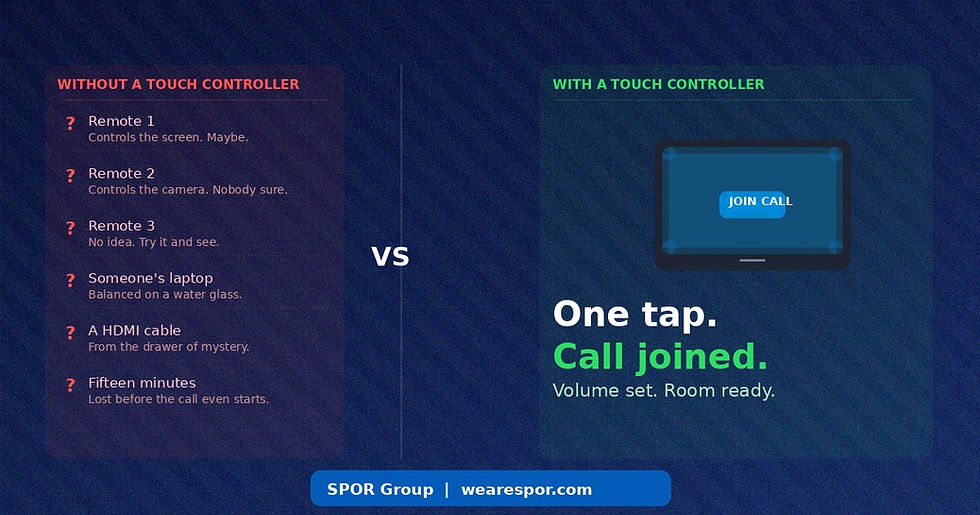
There are three remotes on the table. One controls the screen. One might control the camera. Nobody is entirely sure what the third one does. There is also a laptop balanced on a water glass, a HDMI cable from the drawer of mystery, and fifteen minutes gone before the call has even started.
A touch controller is the device that makes all of that disappear. It sits on the table or mounts outside the room, shows you everything you need on one screen, and lets anyone join a call, adjust the volume, control the camera and manage the room with a single tap. No cables. No remotes. No standing at the front pressing buttons while twelve people watch.
Here is everything you need to know about them, what they actually do, and how to choose the right one for your space.
What a Touch Controller Actually Does

The job of a touch controller is to give anyone in the room — not just the IT-literate person who happens to be in the meeting — complete control over the technology without needing to know how any of it works underneath.
Joining meetings
The most important thing a touch controller does is make joining a call genuinely simple. Scheduled meetings appear on the screen automatically, pulled directly from your calendar. One tap and the call is joined. Camera on, audio connected, display showing the right thing. No entering meeting codes, no selecting the right input, no unplugging someone else's laptop first.
Controlling the room
Once in a call, the touch controller becomes the central control point for everything. Muting the microphone, adjusting the speaker volume, switching the camera view, changing the display layout. All of it accessible from the table without anyone needing to stand up, find a remote or open a settings menu on a laptop.
Booking and availability
Wall-mounted panels outside the room show live availability with a colour-coded LED. Green means free. Red means occupied. Someone can book the room on the spot directly from the panel, or check how long the current meeting is running without knocking on the door. For businesses losing productive time to meeting room conflicts and ghost bookings, this alone justifies the investment.
Starting ad-hoc meetings
Not every meeting is in the calendar. A touch controller lets anyone walk into an available room, start an instant meeting and get going in under thirty seconds. No laptop, no HDMI cable, no asking IT to help.
Table Panel or Wall Panel — Which Do You Need?

This is where most people get confused, because there are two distinct types of touch controller and they do different things.
The table controller
This sits on the meeting room table and gives in-room participants full control of the call. The Logitech Tap, Yealink CTP25 and Poly TC10 are all well-regarded options here. They are certified for Microsoft Teams and Zoom, connect cleanly to the room system, and put everything the meeting needs on a single touchscreen within reach of whoever is running the session. Budget around £400 to £600 for a quality unit. For a full breakdown of Logitech hardware costs, see our Logitech meeting room cost guide.
The wall or door panel
This mounts outside the room and handles scheduling and availability. The Logitech Tap Scheduler and Jabra Scheduler both do this well, showing live room status with a colour LED that is readable from across the corridor. People can check availability, book the room, or see how long the current meeting is running without disturbing anyone. Budget around £300 to £500 for a standalone scheduling panel.
Do you need both?
For small rooms with straightforward meeting patterns, a table controller alone is often sufficient. For medium to large rooms used by multiple teams, or offices where room availability is a constant source of friction, combining both is the more professional outcome. The table controller runs the meeting. The wall panel manages the space around it.
Why the Installation Matters as Much as the Device
A touch controller that is not correctly configured to the room system does nothing. One that is configured correctly but positioned badly — too far from the presenter, at the wrong angle, not within reach of anyone at the table — gets ignored after a week.
SPOR Group installs and commissions touch controllers as part of a complete meeting room setup. The device is specced to the room, positioned correctly, fully integrated with the Teams or Zoom system, and tested before anyone walks in for a meeting. Every installation is then backed by SPORTrack, which monitors the device in real time so that faults are caught before a meeting is affected.
To see what a complete, properly installed meeting room environment looks like in practice, read how SPOR Group delivered a full Microsoft Teams Rooms setup for Masdar's London headquarters and how the NFL rebuilt their London HQ into a world-class collaboration hub.

Not Sure Which Touch Controller Is Right for Your Room?
SPOR Group specs, installs and monitors touch controller solutions for businesses across the UK. Tell us your room size, platform and headcount and we will tell you exactly what you need.
|
Frequently Asked Questions About Meeting Room Touch Controllers
What is a meeting room touch controller?
A touch controller is a tablet-style device that sits on the meeting room table or mounts outside the room. It gives participants one-tap access to join calls, control the camera and microphone, adjust volume, manage room booking and switch inputs — without needing to use a laptop, remote control or manual settings.
What is the difference between a table controller and a wall panel?
A table controller sits inside the room and is used by meeting participants to control the call in progress. A wall or door panel mounts outside the room and shows availability with a colour LED, allowing people to book the space or check how long a meeting is running without entering. Many rooms benefit from both.
Do I need a touch controller if I already have a video bar?
In many cases yes, particularly for rooms used by more than four people or where meeting booking and availability are managed by multiple teams. A video bar handles the camera, microphone and speakers. A touch controller makes the system usable by anyone in the room without IT knowledge. They are complementary, not interchangeable.
Which touch controller works with Microsoft Teams?
The Logitech Tap and Logitech Tap Scheduler are both certified for Microsoft Teams Rooms. The Yealink CTP25 and Poly TC10 are also strong options. All should be certified for Teams Rooms specifically, not just compatible — the difference in reliability and feature access is significant.
How much does a meeting room touch controller cost?
Table controllers for in-room use typically cost between £400 and £600 for a quality, certified unit. Wall scheduling panels run from around £300 to £500. Professional installation adds £200 to £400 depending on the room. For a full picture of meeting room AV costs, read our 2026 pricing guide.
Can a touch controller be monitored remotely?
Yes. SPOR Group's SPORTrack platform monitors all connected AV devices including touch controllers in real time. If a panel goes offline or reports a fault, SPORTrack catches it before it becomes a problem in the next meeting.
Related Posts
External links used in this post:
• Logitech Tap — official product page — certified specifications and room controller features
• Jabra Scheduler — AV Magazine review — independent coverage of Jabra's 2025 scheduling panel launch


Comments