
What Is Poly Lens and Should Your Business Be Using It?

What is Poly Lens and should your business be using it? The honest guide to HP Poly's device management platform and how it compares to SPORTrack.
Chris Gore | Updated 2026
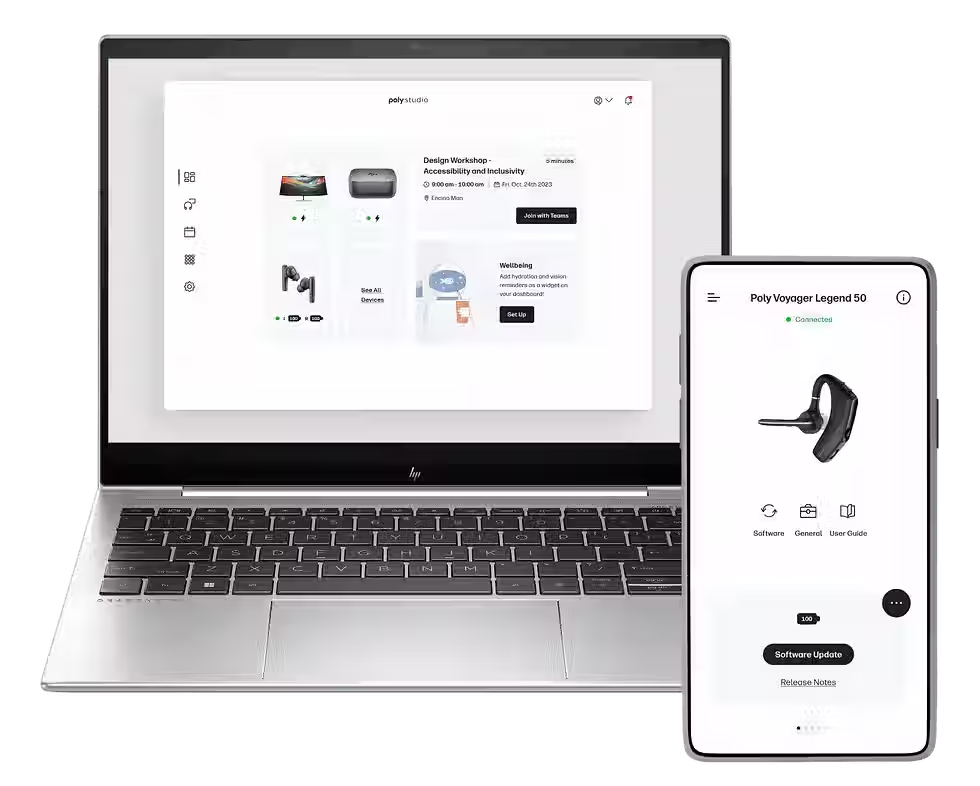
HP Poly is one of the longest-established names in meeting room audio-visual hardware. Their video bars, cameras, headsets and conference phones appear in meeting rooms across the UK. Poly Lens is the cloud-based device management platform that gives IT teams visibility and control over their HP Poly hardware estate from a single dashboard.
This guide covers what Poly Lens actually does, its limitations and how it compares to a managed monitoring service like SPORTrack for organisations with mixed-brand AV estates.
What Poly Lens Actually Does
Device inventory and health monitoring
Every HP Poly device in the estate visible in one cloud dashboard. Online or offline status. Device type, firmware version and configuration visible per device. Alerts configurable for offline devices and devices falling outside normal operating parameters. Available at no additional cost with HP Poly hardware purchase on the basic tier.
Firmware management
Push firmware updates to HP Poly devices centrally from the dashboard. Schedule updates to run out of hours to minimise disruption. Track firmware version compliance across the estate. This is one of the most valuable features of Poly Lens for IT teams managing a Poly estate, eliminating the manual per-device update process.
Room analytics
Meeting frequency, call duration and device utilisation by room. Useful for identifying rooms that are underused and justifying space decisions. Data is held within the Poly Lens platform and exportable for further analysis.
Remote diagnostics
Investigate device issues remotely before dispatching an engineer to site. Review device logs, test connections and attempt remote reboots without a site visit. Reduces unnecessary engineer callouts for issues that can be resolved remotely.
Integration with Teams Admin Centre
HP Poly Teams Rooms certified devices appear in both Poly Lens and Microsoft Teams Admin Centre. The two platforms provide complementary visibility, Poly Lens gives HP Poly-specific data, Teams Admin Centre gives the Teams Rooms platform view.
Poly Lens vs SPORTrack: What Is the Difference?
Poly Lens
• HP Poly devices only, video bars, cameras, headsets, conference phones
• Cloud management provided by HP Poly directly
• Firmware and device health management for Poly hardware
• Usage analytics for Poly devices
• Free with Poly hardware on the basic tier
• Limited to the HP Poly estate, no visibility of Logitech, Yealink, Cisco or Neat devices
SPORTrack by SPOR Group
• All AV devices — any brand, any manufacturer in the same estate
• Managed by SPOR Group helpdesk with human response to alerts
• Proactive monitoring across Logitech, Yealink, Cisco, Poly, Neat and others
• Firmware alerts and managed updates across the mixed estate
• Quarterly business reviews with a dedicated SPOR account manager
• 97 percent uptime across monitored rooms. Book a SPORTrack demo to see it working
Most AV estates include hardware from more than one manufacturer. Poly Lens provides excellent visibility for HP Poly hardware. For a complete picture of the estate across all brands, Logitech, Yealink, Cisco, Neat and Poly, SPORTrack monitors everything in one platform with a SPOR helpdesk team responding to alerts.
Managing a Mixed-Brand AV Estate?
SPORTrack monitors every AV device regardless of manufacturer. Book a demo to see the platform working across a live estate.
|
Frequently Asked Questions
What is Poly Lens?
Poly Lens is HP Poly's cloud-based device management platform. It provides IT teams with visibility and control over HP Poly meeting room hardware, device health, firmware management, usage analytics and remote diagnostics, from a single dashboard.
Is Poly Lens free?
The basic tier of Poly Lens is available at no additional cost with HP Poly hardware purchase. Advanced analytics and management features are available on paid tiers.
Does Poly Lens work with Microsoft Teams?
HP Poly Teams Rooms certified devices appear in both Poly Lens and Microsoft Teams Admin Centre. The platforms provide complementary visibility, Poly Lens for HP Poly-specific data and Teams Admin Centre for the Teams Rooms platform view.
What is the difference between Poly Lens and SPORTrack?
Poly Lens covers HP Poly devices only and is managed by HP Poly. SPORTrack is SPOR Group's monitoring platform covering all AV brands in a mixed estate with a human helpdesk team responding to alerts and quarterly business reviews with a dedicated account manager.

Comments