
The 4 Non-Negotiable Things Every Conference Room Needs

Four components. Get them right and your rooms work. Get them wrong and you have a very expensive source of frustration.
Chris Gore \ Updated 2026

Your team joins a video call. The client cannot hear you. The screen will not connect. Someone is frantically unplugging and replugging cables while twelve people stare at their laptops wondering who is going to fix it.
That is not a technology problem. That is a planning problem. And it comes down to four things that were either specced incorrectly, bought cheaply, or simply not thought about at all. Here is what every conference room actually needs — and how to get each one right.
Why Most Conference Rooms Fail Before Anyone Walks In

Most businesses spend serious money on their offices. Herman Miller chairs. Coffee machines that cost more than a small car. Glass walls and beautiful lighting. And then they Frankenstein together an AV setup from three different brands that were never designed to work with each other, bought from whatever was in stock, and installed by whoever was available.
A client moved into a brand new office a few months back. Beautiful space. They had spent an absolute fortune on the fit out. The meeting rooms were a car crash. Cheap screens, a webcam balanced on top, a Bluetooth speaker from a high street retailer. First week in, they were presenting to a major client. Screen started flickering. Nobody could hear anything. Camera was pointing at the ceiling. The MD was sweating. A fifty thousand pound deal was sitting on a knife edge — and it nearly walked out the door.
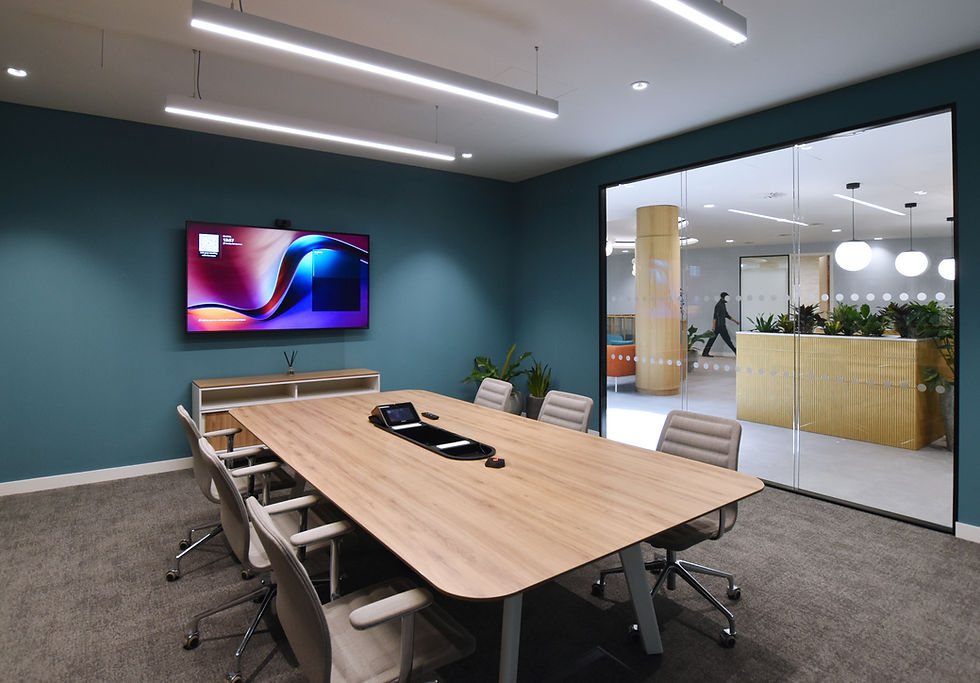
The meeting room is only as good as the experience inside it. And the experience is made up of exactly four components. Get these four right and your rooms work. Get them wrong and you have employees telling you they would rather work from home. The full cost picture is worth understanding before you spec anything — our 2026 meeting room AV cost guide covers it in detail.
The Four Conference Room Essentials

1. Display
Every video conferencing space needs a display. That is obvious. But here is where businesses start cutting corners — they assume the only option is a wall-mounted LCD screen from a high street electronics retailer. A consumer television is not a commercial display. It is not built to run all day. It does not have the right mounting options. And it has smart TV software running in the background fighting everything else in the room.
Beyond that, the display does not have to be a flat screen on a wall. If your room has an art feature, a window you do not want to block, or simply no decent wall space, a projector is worth serious consideration. Good projector options with multiple input choices can be paired with wireless sharing solutions so people walk in, share content from their own device, and get on with it. No cables. No dongles. No drama.
The display is your window to the outside world. Do not cheap out on it and do not limit your thinking to whatever is on sale this week.
2. Microphone
This is the one people get wrong most often. And it is arguably the most important of the four. Think about it — you can tolerate a slightly imperfect picture. A bad audio experience kills the call completely. People ask you to repeat yourself. They disengage. The meeting falls apart.
The gold standard for professional meeting rooms is the ceiling microphone array. Shure microphones are the ones SPOR Group spec regularly because the experience they deliver is exactly what a meeting room should feel like. People walk in. They sit down. It just works. Voices are picked up clearly from anywhere in the room without anyone needing to pass a microphone around or lean toward a device in the middle of the table.
The experience is what you are paying for with a ceiling mic array. It is worth every penny.
3. Speakers
The speaker is not an afterthought. And it is definitely not a Bluetooth device from a retail shelf. For a professional meeting room you want speakers that are purpose-built for the environment — designed for conference rooms, clean audio right the way across the whole room, not just near the device itself.
The QSC series is a strong example of what purpose-built conference audio looks like. Pendant mounted, surface mounted, ceiling recessed — available in different sizes and configurations depending on the room. The key point is matching the speaker to the space. A small huddle room for four people needs a completely different speaker to a large boardroom that holds twenty. Getting advice on this before buying anything is worth doing.
4. Camera
The camera is how you show up on the call. With hybrid working now the norm rather than the exception, this matters more than it ever has. A webcam balanced on top of a screen is not a professional camera solution. It is a stopgap.
For larger meeting rooms, PTZ cameras are the right choice. Pan, tilt, zoom. They track movement, frame speakers automatically, and integrate cleanly with the rest of the room ecosystem. QSC PTZ cameras, for example, sit within the QSC ecosystem and use AV over USB bridging to connect to a computer. The result is that whether the room is running Teams, Zoom, Google Meet or anything else, the camera just works with a single cable. No compatibility headaches. Platform agnostic. One cable, you're live.
If you are not sure whether your room needs a PTZ camera or whether a video bar covers the requirement, read our guide on what a PTZ camera is and when you actually need one on the SPOR learning centre.
Watch the full video below!
The Bonus: Control
Once all four components are working, the icing on the cake is bringing them together under one control system. A touch panel on the table or wall that lets anyone walk in, mute the microphones, adjust the volume, lower the screens, turn everything on and off, and join a call without touching four different remotes or hunting for whoever set the room up eighteen months ago.
Something like a QSC touchscreen panel ties the entire room together into a single, simple interface. That is what a properly designed conference room actually looks like. And once your people experience a room that works this way, they will not go back. They will stop complaining about the commute.
READY TO GET STARTED?
Get a price for your meeting rooms — in minutes
Fill out a short form — tell us your room sizes, headcount and platform. We'll come back to you with exactly what we'd recommend and why, with a price guide included.
No jargon. No pushy sales calls. Just a straight answer.
TAKES 2–3 minutes | INCLUDES Full price guide | COST Completely free |
Frequently Asked Questions
What does every conference room need?
Every conference room used for video calls needs four things: a commercial-grade display, a professional microphone (ideally ceiling-mounted), purpose-built speakers matched to the room size, and a certified camera. For larger rooms or more complex setups, a control panel that ties everything together is the fifth essential component.
Why do most conference room setups fail?
Most failures trace back to the same root causes: consumer-grade equipment bought cheaply, components from different brands that were never designed to work together, no professional installation or commissioning, and no ongoing monitoring or support after handover.
What type of microphone is best for a conference room?
A ceiling microphone array is the gold standard for professional meeting rooms. It picks up voices from anywhere in the room without requiring anyone to lean toward a device or pass a microphone around. Shure ceiling mic arrays are widely considered the benchmark for this type of installation.
Do I need a PTZ camera for my conference room?
It depends on the room size. For small to medium rooms with up to ten seated participants, a well-specified video bar typically covers the camera requirement. For larger rooms, rooms where the presenter moves around, or executive spaces where image quality is non-negotiable, a PTZ camera is the better choice.
What is a conference room control panel?
A control panel is a touchscreen device — typically sitting on the table or mounted on the wall — that ties all of the room's AV components together under one interface. It lets anyone in the room join a call, mute microphones, adjust volume, and control the display without needing to know how any of the underlying systems work.
How much does a properly set up conference room cost?
It depends significantly on room size and component selection. A well-specced small meeting room can be delivered for under £5,000. Larger rooms with ceiling microphones, PTZ cameras and a control system will cost more. Our 2026 meeting room AV cost guide covers the full picture with honest pricing.
Related Posts
External links used in this post:
• Shure — professional ceiling microphone arrays — referenced as the gold standard ceiling mic solution for conference rooms
• QSC — conference room speakers and cameras — referenced for professional conference audio and PTZ camera solutions

Comments