
How Much Does It Cost to Kit Out a Meeting Room? A Honest Guide for 2026
- Chris Gore

- Mar 17
- 4 min read
If you're an IT Director or Facilities Manager trying to get a ballpark figure for meeting room AV, you've probably hit a wall of vague answers and "it depends" responses from suppliers.
So let's cut through that.
This guide gives you real-world pricing for a fully supplied and installed meeting room, from a huddle space up to a large boardroom. No fluff, no bait-and-switch. Just honest numbers so you can plan properly.

First, a Quick Caveat
Every building is different. Cable runs, wall construction, ceiling heights, network infrastructure, all of it affects final cost. Any responsible AV company will tell you that a site survey is essential before anything is confirmed in writing.
What we're giving you here are guide prices based on our standard room deployment framework. They're accurate enough to budget with confidence, but your final quote may shift slightly once we've seen the space.
These prices cover supply and installation only. They do not include ongoing maintenance, managed services, or remote monitoring, we'll come to that at the end. The prices laid out below are also your "Fiat Punto" costs. Based on the cheaper end of product. We will write further articles showing the "Ferrari" options. Both do the same job but cost and quality differs significantly.
The Room Types and What They Cost
We break meeting rooms into five sizes. Here's what each one typically costs to kit out properly with a basic setup running in Windows Mode (more on the difference between Windows and Appliance Mode below).
Huddle Room (2–4 People) — Appliance Mode
Guide Price: £3,200 – £3,800
This is your small, informal collaboration space. Think two to four people on a quick call or a team catch-up. The tech spec is leaner — typically an all-in-one video bar, a display, and a touch controller. Simple to use, quick to deploy.
Appliance Mode means the conferencing software runs directly on the device itself. No PC needed in the room. Plug it in, it works. Great for high-frequency, low-complexity spaces.

Small Meeting Room (6–8 People) — Windows Mode
Guide Price: £4,700 – £5,800
This is the bread and butter of most office estates. Six to eight people, a formal meeting room, used for client calls, team standups, and internal reviews. You need it to be reliable.
Every single time.
At this level you're typically looking at a display, a dedicated video conferencing camera, microphone array, loudspeakers, and a touch panel controller. The room runs on a Windows-based PC that sits behind the scenes.
Windows Mode gives your IT team more control. You can push updates remotely, integrate with your existing Microsoft environment, and manage the device like any other endpoint on your network.
Small Meeting Room (6–8 People) — Appliance Mode
Guide Price: £3,500 – £4,200
The same room, simpler setup. If you don't need the full Windows environment and just want a room that fires up Teams or Zoom reliably, Appliance Mode does that job well and costs less. Good option for satellite offices or lower-demand rooms.
Medium Meeting Room (10–12 People) — Windows Mode
Guide Price: £5,500 – £6,700
Once you move into double figures, the complexity increases. Larger rooms need wider audio pickup, often more than one microphone, and a camera with a field of view wide enough to capture the whole table.
At this size, a cheap setup will fail you. The person at the far end of the table will be a distant blur, and the remote attendees will miss half the conversation. That's not a minor inconvenience — it actively undermines the purpose of the meeting.

Medium Meeting Room (10–12 People) — Appliance Mode
Guide Price: £4,500 – £5,500
Appliance Mode at this room size still performs well with the right hardware. Yealink's mid-range conferencing bars handle 10-12 person rooms comfortably if the room acoustics are decent.
Large Meeting Room (14–16 People) — Windows Mode
Guide Price: £7,600 – £9,300
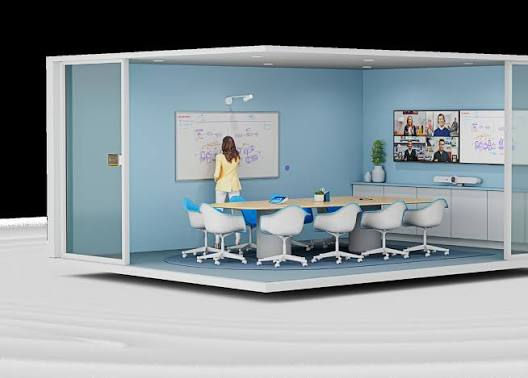
Now we're into proper boardroom territory. At this size, you're often looking at dual displays, a PTZ camera or multiple camera setup, ceiling or table microphones, and a more sophisticated control system.
The gap between a well-specced room and a poorly-specced one becomes very visible at this scale. A camera that doesn't track speakers, microphones that don't reach the ends of the table, a display that's too small for the back row — these aren't aesthetic issues, they're functional ones.
Large Meeting Room (14–16 People) — Appliance Mode
Guide Price: £5,900 – £7,300
Extra Large Meeting Room (18–20 People) — Windows Mode
Guide Price: £14,400 – £17,600
At this level, you're building a high-performance AV environment. Multiple displays, advanced camera systems, integrated audio distribution, and full control room management. This is the kind of space where board meetings, major client presentations, and all-hands sessions happen. It needs to perform without question.
Extra Large Meeting Room (18–20 People) — Appliance Mode
Guide Price: £8,200 – £10,000
What's Included in These Prices?
All of the above cover:
Hardware supply (displays, cameras, microphones, controllers, cabling)
Professional installation by accredited engineers
Configuration and commissioning
Basic user handover and training
What's not included: ongoing support, remote monitoring, warranty management, or proactive maintenance.
The Part Most People Overlook
Here's the thing. You can spend £6,000 on a meeting room and have it fail on the morning of your most important client call. Not because the kit was bad, but because nobody was watching it.
AV systems need management. Firmware updates, health monitoring, fault detection. Without that, you're flying blind.
That's where SPORTrack comes in. It's our remote monitoring platform that watches your AV estate around the clock, flags issues before they become failures, and gives your IT team full visibility across every room in every location.
A well-installed room without monitoring is like a car without a dashboard. It might run fine.
Until it doesn't.
Want to see what SPORTrack looks like in a live environment? Check it out here


Comments