
7 Things Every Hybrid Meeting Room Needs (And What to Skip)

Most hybrid meeting rooms fail because of the wrong kit. Here are the 7 things every room actually needs, and what to skip
Chris Gore \ Updated 2026

Most companies are spending thousands on meeting room technology they do not need and still ending up with rooms that do not work properly. Spend all that money, it breaks, nobody knows how to fix it, and people end up balancing laptops on boxes because at least they know how their laptop works.
Hybrid work is not going away. The meeting rooms need to work. And nine times out of ten, the problem comes down to the wrong equipment chosen at the very start. So here are the seven things everyhybrid meeting roomneeds. Not twelve. Not twenty-seven. Seven. What to buy, what to look for, and what to skip.
The Problem With Most Hybrid Meeting Room Setups
An IT director called with a story that probably sounds familiar. Big company, decent budget. They had just had a boardroom kitted out with top of the range kit. Digital signage, a fancy control panel, motorised blinds linked to the AV, ceiling mics, the whole lot. First week in, the CEO tries to join a Teams call and the camera is pointing at the ceiling. Nobody knows how to switch the endpoints. The motorised blinds close halfway through a presentation. Forty thousand pounds. Absolute carnage.
The kit itself was not bad. It was the wrong kit for that room, that team and how they actually worked. There is a massive difference between meeting room technology that looks impressive and meeting room technology that does the job day in, day out. Big integrators overcomplicate things. They sell the dream. And then the team is left with a room nobody understands, that breaks in weird ways, and that nobody knows how to fix when it goes wrong.
The seven items below are the baseline. Every room. Every size. Every budget. You can scale the quality of each one as the room size grows. But you should never skip one. For a full breakdown of what these items cost, read our 2026 meeting room AV cost guide
Item 01: Camera
The camera is the most important piece of kit in the room, or at least joint with the microphone. If remote participants cannot see the room clearly, the meeting is broken before anyone has said a word.
For a standard meeting room, look for a field of view in the region of 120 degrees. Autoframing is a genuine game changer — it means the camera tracks the conversation and keeps people centred in the shot without anyone touching a control. Logitech Rally, Neat Bar and Owl Labs bars all do this well at different price points.
For larger rooms and boardrooms, a PTZ camera — pan, tilt, zoom — is the right choice so you can actually see the faces of people sitting further back. Do not cheap out on the camera. A bad one makes remote participants feel like they are an afterthought and that kills collaboration.

• Field of view: 120 degrees minimum for standard rooms
• Autoframing: essential — tracks conversation without manual control
• USB-C or HDMI connectivity
• PTZ for large rooms and boardrooms
Item 02: Microphone
If the camera is where people see, the microphone is where the call dies completely if it is wrong. Get the mic wrong and everyone on the call can hear the air conditioning when one person is trying to speak. That is not a technology problem — it is a specification problem.
For most meeting rooms, a ceiling mic or a conference table mic does the job. The key specification to focus on is pickup range — how big is the table, how many people are in the room. Match the microphone to the space. For smaller rooms, a bar solution at the front that combines camera and microphone in one unit reduces cables and complexity. Echo cancellation and noise suppression are not optional extras. They are non-negotiable.

• Match pickup range to table size and headcount
• Ceiling mic or table conference mic for most rooms
• Bar solution for smaller rooms — combined camera and mic
• Echo cancellation: non-negotiable
• Brands: Shure, Biamp, Yamaha at different budgets
Item 03: Display
The screen is obvious. But there are still choices here that catch people out. Size matters. People at the back of the room need to be able to see what is on the screen. A rule of thumb that works well: one inch of screen diagonal for every foot of viewing distance.
Dual screens are excellent for hybrid meetings. One screen for the content being shared, one screen for the video call participants. When people can see the faces of the people they are talking to at the same time as the presentation, engagement goes up. It is human nature. And use commercial displays — not consumer televisions. Consumer displays are not built for the hours, the connectivity requirements or the commercial environment of a meeting room.

• Rule of thumb: one inch of screen diagonal per foot of viewing distance
• Dual screens: one for content, one for participants
• Commercial display only — not a consumer television
Item 04: Computer or Codec
This is the brain of the room. It runs the video conferencing platform — Teams, Google Meet, Zoom, whatever the organisation uses. There are two main options: a dedicated room system like a Microsoft Teams Rooms device, or a bring your own device setup where people bring their laptop and connect.
Both work. A dedicated room system gives a cleaner experience — you invite the room to the meeting rather than a laptop, and the consistency is what matters for rooms used heavily throughout the day. If budget is tight, a good bring your own device setup works, but the connection needs to be instant. Not a three minute plug-in while everyone stares at each other. For more on dedicated room systems, read how Pinebridge Investments standardised their Teams Rooms across their London headquarters.

• Dedicated room system: cleaner, more consistent experience
• BYOD: works if connection is instant
• Invite the room to the meeting, not someone's laptop
Item 05: Touch Controller
A touch panel on the table or wall that lets anyone launch the call, control the display and adjust the volume. Nothing complicated. The simpler the better. This replaces the fifteen different remote controls that nobody can find, with one panel that anyone can use without training.
Logitech Tap, Neat Pad, Crestron — plenty of options at different price points. Match it to the conferencing platform and the rest of the system and it just works.

• One panel replaces fifteen remotes
• Launch call, control display, adjust volume
• Options: Logitech Tap, Neat Pad, Crestron
• Match to the conferencing platform
Item 06: Wireless Presentation System
This is the one that gets skipped more often than it should. In a mixed room — some people on Mac, some on Windows, someone on a tablet — a wired connection only works if everyone has the right cable. They never do. Someone always has a different laptop.
A wireless presentation system like Barco ClickShare or Mersive Solstice means anyone can share content instantly from any device without hunting for the right cable. The room looks cleaner. Meetings start faster. T

hat is the argument for it.
• Any device, any platform, no cable required
• Options: Barco ClickShare, Mersive Solstice
• Faster meeting starts and a cleaner looking room
Item 07: Cable Management
Not glamorous. Not exciting. But necessary. Beautifully expensive meeting rooms with cables everywhere is one of the most common things SPOR Group sees on site visits. In-table power management, USB ports within the table surface and proper cable routing under the floor or through the walls make the room look professional and the infrastructure perform reliably.
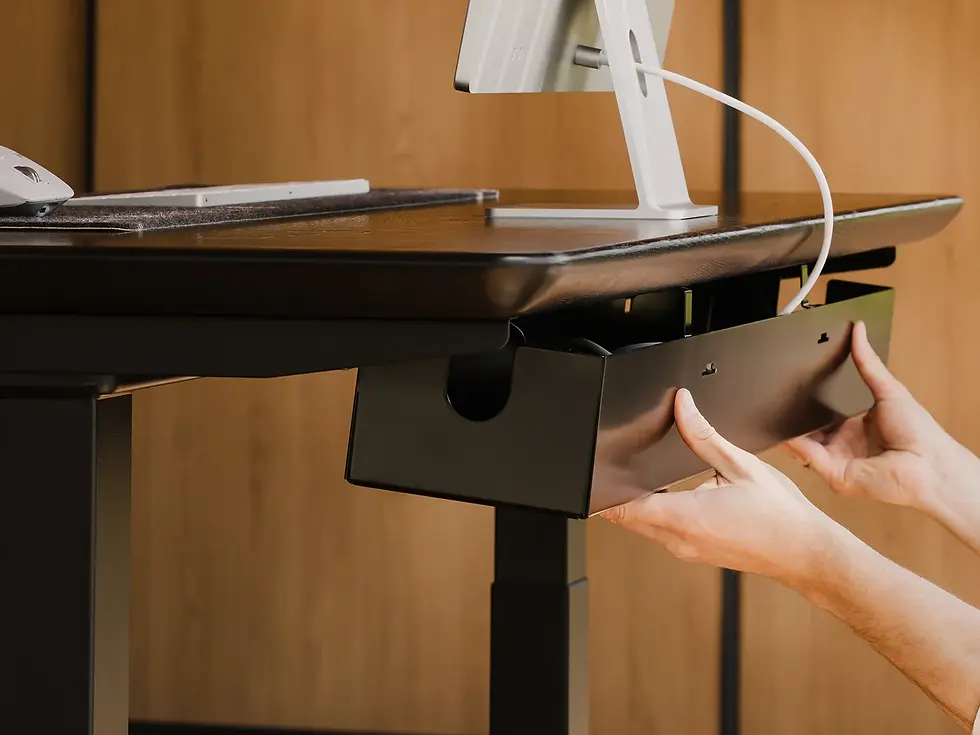
Get the infrastructure right and everything else performs better. Cheap out on cable management and you undermine everything else in the room.
• In-table power and USB ports
• Proper cable routing — not trailing across the floor
• Clean infrastructure makes everything else perform better
Watch the full video below...
The Recap
• Camera — wide angle, autoframing, right connectivity
• Microphone — matched to room size, echo cancellation built in
• Display — right size, consider dual screens, commercial grade
• Computer or codec — dedicated room system or instant BYOD
• Touch controller — one panel, simple, matched to platform
• Wireless presentation — any device, no cable required
• Cable management — in-table power, proper routing, clean finish
You can get all seven of these right. You can design a great room and have the installation go perfectly. And then six months later the equipment starts failing because nobody is monitoring it. Nobody notices the camera is broken until the board meeting has already started. That reactive approach is what we built SPORTrack to fix. Read our guide on the 4 non-negotiable things every conference room needs for more on getting the spec right from the start.
READY TO GET STARTED?
Get a price for your meeting rooms — in minutes
Fill out a short form — tell us your room sizes, headcount and platform.
We'll come back to you with exactly what we'd recommend and why, with a price guide included.
No jargon. No pushy sales calls. Just a straight answer.
TAKES 2–3 minutes | INCLUDES Full price guide | COST Completely free |
Frequently Asked Questions
What does every hybrid meeting room need?
Every hybrid meeting room needs seven things: a camera with autoframing, a microphone matched to the room size, a commercial-grade display, a computer or codec to run the platform, a touch controller for one-tap joining, a wireless presentation system for cable-free content sharing, and proper cable management throughout.
What is the most important piece of kit in a meeting room?
The camera and microphone are joint first. If remote participants cannot see or hear the room clearly, the meeting is broken regardless of everything else in the space. The camera needs a wide field of view and autoframing. The microphone needs to be matched to the room size with echo cancellation built in.
Should I use a dedicated room system or bring your own device?
A dedicated room system gives a cleaner, more consistent experience — you invite the room to the meeting rather than someone's laptop. For rooms used heavily throughout the day, that consistency matters. BYOD works if the connection is truly instant. If it takes more than thirty seconds to connect, people will stop using it.
What is autoframing on a meeting room camera?
Autoframing is an AI feature that tracks the active conversation and keeps participants centred in the shot automatically. It means the camera adjusts as people move or speak without anyone manually controlling it. It is standard on most quality meeting room cameras including the Logitech Rally Bar and Neat Bar.
Do I need a wireless presentation system if I already have a touch controller?
Yes. They do different jobs. The touch controller manages the call — joining, volume, camera. The wireless presentation system manages content sharing from any device without a cable. In a room with mixed devices — Mac, Windows, tablets — a wireless presentation system means anyone can share instantly without finding the right adapter.
Why does cable management matter in a meeting room?
Because poor cable management undermines everything else. Cables trailing across the table look unprofessional, create tripping hazards and make the room harder to use. In-table power and USB ports, proper floor or wall routing, and clean cable management make the room look and perform better.


Comments